Quickstart
This guide walks through what each section of notebooks/msm_notebook.ipynb does,
what options you can tune, and what outputs to expect.
For input-file formatting rules, see Data Layout.
For argument-by-argument details of the main Python functions, see Function Reference.
Before you start
Clone the repository:
git clone https://github.com/fberkemeier/MultiLayer-NotchDelta.git
From the repository root:
pip install -r requirements.txt
jupyter notebook notebooks/msm_notebook.ipynb
Detailed walkthrough
1. Dependencies and MSM import
This section imports standard scientific Python libraries and then imports functions from src/msm_model.py.
Use this as a quick sanity check: if import fails here, fix environment/dependency issues before running analysis cells.
2. Data setup and region selection
This section defines which datasets to run and builds all dictionaries used later.
Typical pattern:
wing_regions = ['wd_1', 'wd_2', 'wd_3']

wing_discs = list_wing_discs(wing_regions)
signalling_labels_dict = load_signalling_labels_dict(wing_regions)
wd_dict = build_wd_label_dict(wing_regions)
gap_dict = build_gap_dict(wing_regions)
n_dict = build_n_layers_dict(wing_regions)
heights_dict = build_default_height_dict(wing_regions)

A_dict = build_adjacency_dict(wing_regions)
centroids_dict = build_centroids_dict(wing_regions)
area_apical_dict = build_area_apical_dict(wing_regions)
diam_apical_dict = build_diam_apical_dict(wing_regions)
Key options in this section:
wing_regions: controls which region files are loaded and analyzed.notch_data: user-owned intensity profile array (editable per dataset).heights_dict: can use metadata defaults or values derived fromheight_set.
If this section fails, the most common cause is mismatched names between wing_region_metadata.csv and file names in data/.
3. Single simulation (graph plot)
This subsection sets model parameters and runs one call to compute_band_distance for a selected region.
It is the best entry point to validate that your data and parameters produce expected spatial patterns.
Main parameters users typically change:
wing_region: which dataset to run.Lmax: signalling depth cutoff.omega_type: depth-weight function (exp,cnt,lin,exp0).k, h, Ka, Kr, nu: Notch-Delta model parameters.alpha: straightening level for non-apical contacts.graphsaveQ: whether to save the graph image tofigures/.
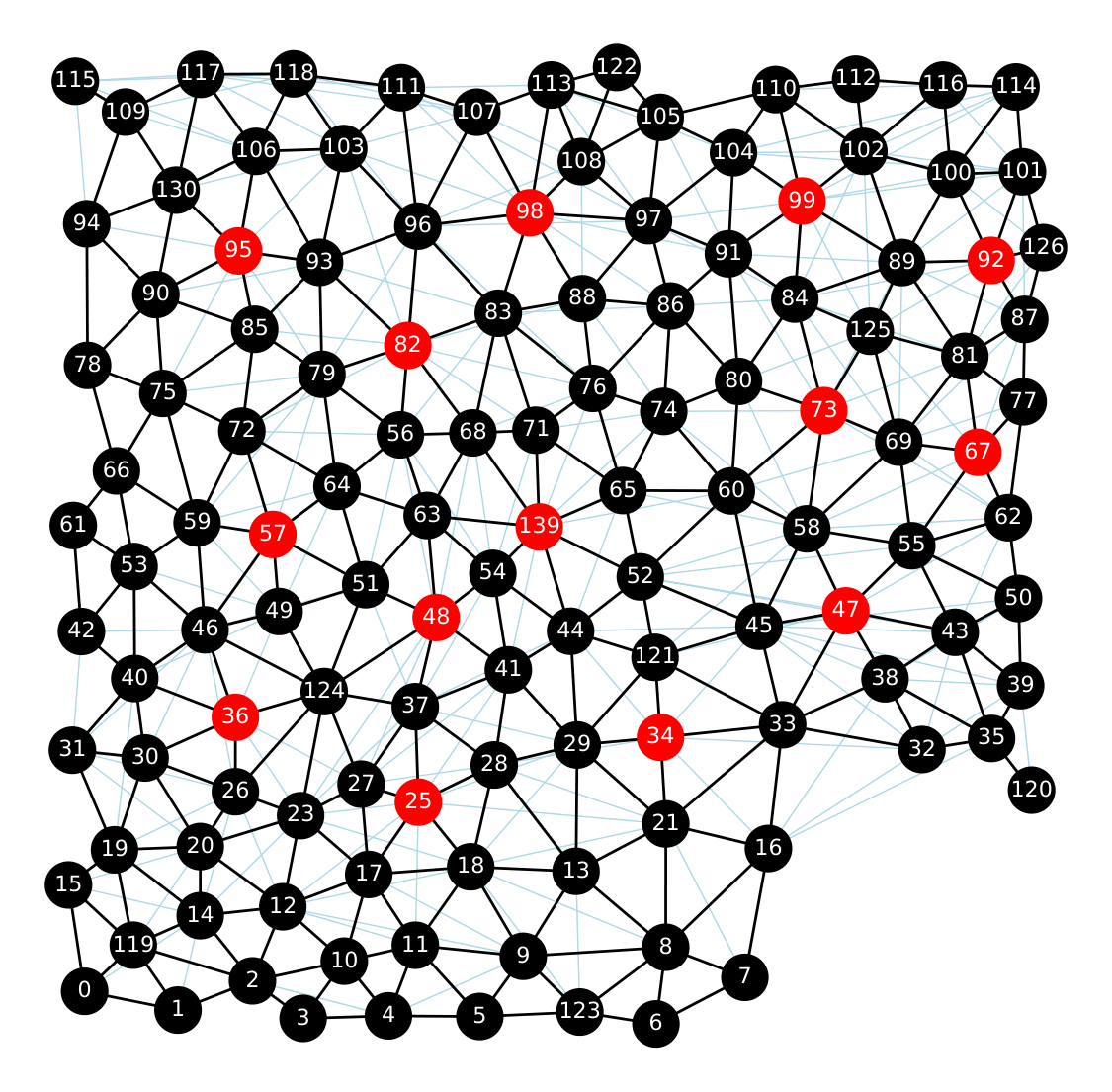
MSM simulation over a wing disc. SOP cells are displayed in red (high Delta).
4. SOP spacing plots
This subsection sweeps depth values (Lmax_list) and computes spacing statistics across selected regions.
It is used to quantify how signalling range affects spacing robustness and degeneracy.
You can control:
spsteps: number of sampled depth points.threshold: SOP threshold used for classification.normalQ: normalize depth weights to a common support.sim_number: number of repeated simulations per condition.plotting style through
fancy_plotparameters.
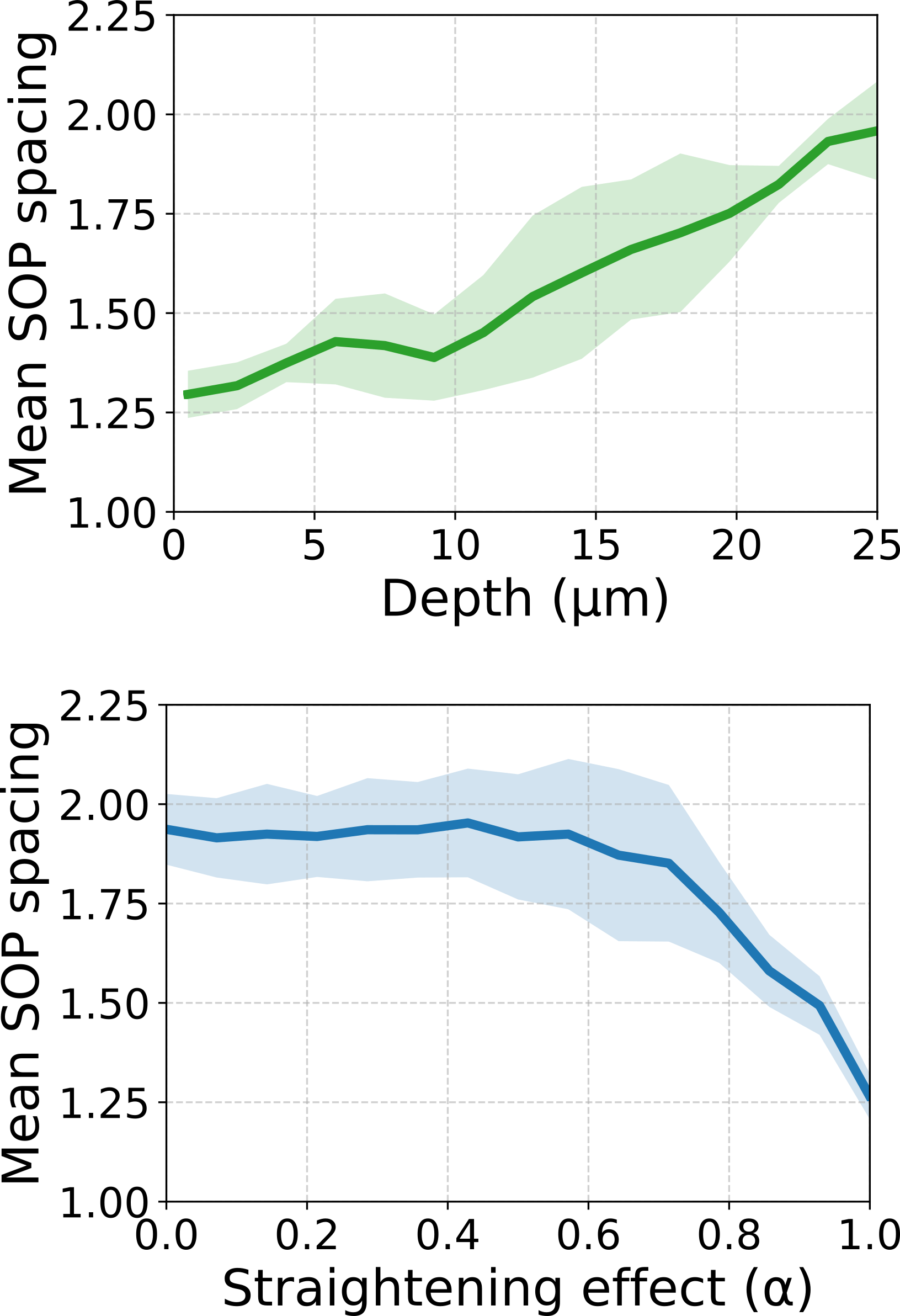
SOP spacing vs depth and straightening for 3 wing discs (wd_1, wd_2, and wd_3).
5. Other analyses
This final section contains complementary analyses:
3D neighbour counts: tests how non-apical connectivity changes under straightening (alphasweep).Notch intensity fitting: fits an exponential profile to measured Notch data.Signalling weight histograms: visualizes integrated layer weightsomega_kby region.
These analyses are useful for mechanistic interpretation and parameter diagnostics before running larger sweeps.
Practical usage patterns
Run one region first (for example
['wd_1']) to validate data and runtime.Keep
randomQ=Falsewhen you want deterministic debugging runs.Enable save flags only once plots look correct to avoid clutter in
figures/.